ANY VIDEO FORMAT CONVERTER FREE
Free Video Converter.
Make It Play.
Convert between video formats like MP4, MKV and MOV.
Choose the output for playback, editing or sharing.
- Multiple Output Formats
- Queue Multiple Files
- Choose Your Output
Windows 10 (2004+) / 11 · x64
START WITH YOUR FILE
Find the Format You Need.
Explore supported formats, or start with a common MP4 conversion.
See Supported Formats
Input Formats
Video
- MP4
- M4V
- MKV
- AVI
- MOV
- WMV
- WebM
- MPEG / MPG
- M2TS / MTS / TS
- VOB
- FLV
- 3GP / 3G2
- ASF
- OGV
- RM / RMVB
- MXF
Audio
- MP3
- M4A
- AAC
- WAV
- FLAC
- Ogg
- Opus
- WMA
- AIFF
- AC-3
- APE
- AMR
- MKA
- M4R
- M4B
- AU
- F4A
Images
- JPG / JPEG
- PNG
- BMP
- WebP
- TIFF
- GIF
Output Formats
Video
- MP4
- MKV
- AVI
- MOV
- WMV
- WebM
- MPEG-1 / MPEG-2 (.mpg)
- M4V
- M2TS
- OGV
- ASF
- MXF
- FLV (Legacy)
- 3GP (Legacy)
- 3G2 (Legacy)
- SWF video (Legacy)
Audio
- MP3
- AAC
- M4A (AAC / ALAC)
- WAV
- FLAC
- Ogg Vorbis
- Opus
- WMA
- AIFF
- AC-3
- AU
- M4R
- M4B
- F4A
Images
- Animated GIF
- JPG / JPEG
- PNG
- BMP
- TIFF
Available conversions depend on the source streams and selected output profile.
Audio exports need an audio track; video and image exports need a video or image source. Still-image output saves one frame; animated GIF is silent.
Popular MP4 Conversions
FROM YOUR CAMERA
MOV to MP4, Made Simple.
A MOV clip that your player cannot open? Convert a copy to MP4 and keep your original.
Read the MOV to MP4 GuideTHREE STEPS. ONE CLEAR WORKFLOW.
From “Won’t Open” to “Press Play.”
Your original stays yours. Create a converted copy.
Add Your Video
Choose one file or build a queue for your next conversion.
Pick Your Format
Select an output format, then choose a preset and an output folder.
Convert and Play
Start conversion, then open your result in your usual player.
FOR THE VIDEOS YOU KEEP
Less File Friction.
More Pressing Play.
Give your clips a format that fits the way you watch, work and share.
Revisit Your Recordings
Make MP4 copies of older clips for everyday playback.
Prepare Your Next Edit
Choose a format your editing app can accept.
Keep Your Library Consistent
Bring mixed video files into a familiar output format.
SIMPLE FIRST. CONTROL WHEN YOU NEED IT.
Your Video. Your Choices.
Start with a preset. Open the details when you want more control.
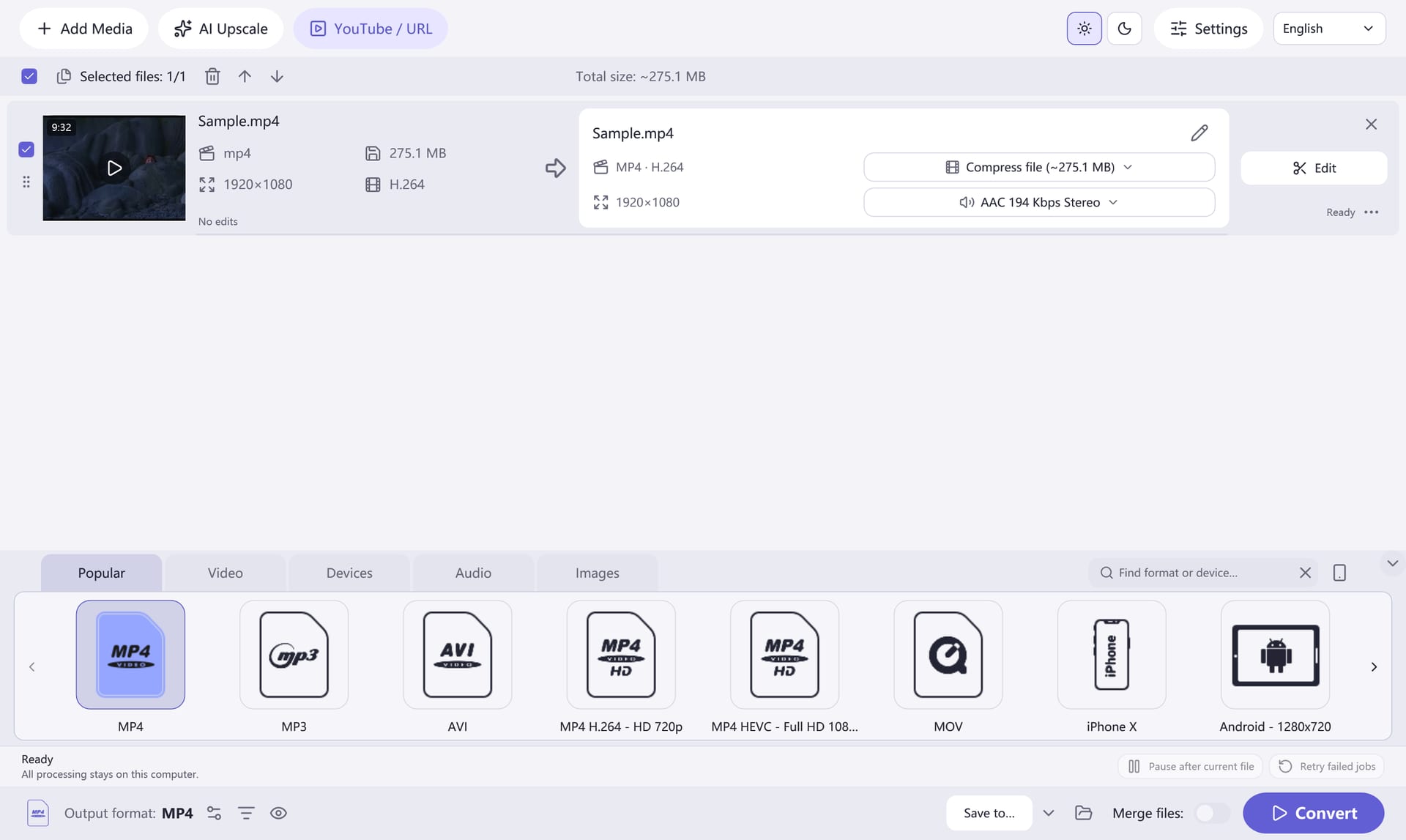
Keep Your Queue in View+
See your added videos in one workspace and prepare several files before you start.
Choose Your Output+
Select an output format and preset, then adjust video, audio and compression settings to suit your destination.
Keep the Part You Need+
Trim, crop or rotate a clip before creating your converted copy.
Open the Trimming GuideMake It Feel Like Home+
Choose a light or dark theme and one of ten interface languages. Projects and conversion history help you pick up where you left off.
Real app interface · Windows
YOUR NEXT VIDEO IS WAITING
Choose Your Format. Press Convert.
Get Any Video Format Converter Free 8.2.0.
Download Free ConverterWindows 10 (2004+) / 11 · x64 · Direct download
Setup may offer optional RelevantKnowledge research on browsing and app activity. Make your choice on its official Agree / Decline screen; the converter works if you decline. Research Privacy · Terms
A LITTLE HELP GOES A LONG WAY
Good Questions.
Clear Answers.
Which Format Should I Choose?+
Choose a format supported by your player or editor. MP4 with H.264 video and AAC audio is a useful starting point for everyday playback.
Can I Convert Several Videos Together?+
Add the files to the queue, choose an output format and destination, then start conversion. Each item keeps its own place in the queue.
Will Conversion Improve a Blurry Video?+
Changing the format does not restore detail that is missing from the original. Keep a copy of your source and avoid unnecessary repeated conversions.
How Do I Make a Smaller File?+
Output size depends on duration, resolution, frame rate and bitrate. Start with a lower resolution or bitrate, preview a short sample, and compare the result before converting everything.
Do I Need to Upload My Videos?+
Local video files are converted by the desktop app. You choose the files and the output folder on your Windows PC.
Which Windows Versions Can I Use?+
Version 8.2.0 requires Windows 10 version 2004 or later, or Windows 11, on an x64 PC. The self-contained package includes the required .NET runtime.